Free in the current release · No account required
Try a chemical reaction in a virtual lab
Choose two chemicals from a supported pair. OmniLab returns a balanced equation, a plain-language explanation, three safety notes, and a visible reaction cue when the result includes bubbling or a precipitate.
Try Sodium + ChlorineYou stay in control of when to request a prediction.
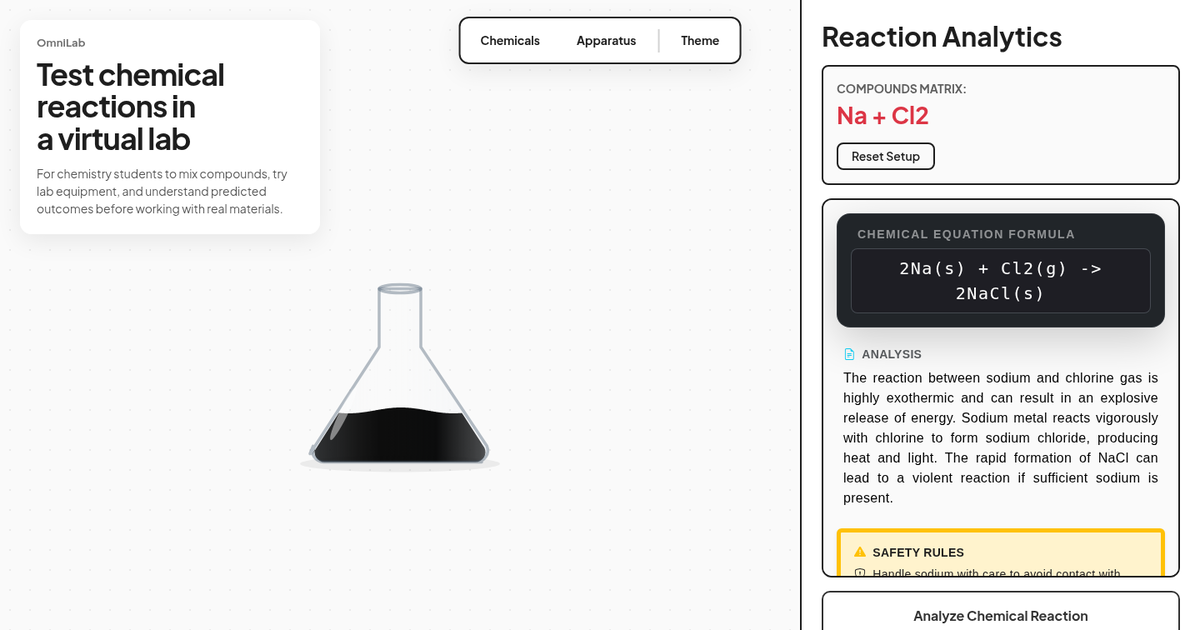 Real OmniLab result
What you get
One setup, four ways to read the result
Balanced equation
See the reactants, products, coefficients, and physical states for the supported pair.
Short explanation
Connect the equation to the reaction type, particle changes, and expected observation.
Three safety notes
Read reaction-specific cautions before treating the prediction as preparation for real work.
Visible cue
Watch bounded bubbles or colored precipitate where the supported result includes one.
How to use the lab
From a question to a reaction prediction
OmniLab keeps the path short so you can focus on reading the chemistry rather than learning a complex interface.
- 1
Choose your first chemical
Open the Chemicals menu and select one of the 27 available substances. The lab then marks every chemical that forms one of its 23 supported pairs with your first choice.
- 2
Add a supported partner
Select the marked partner by click, tap, keyboard, or drag. You can also choose a flask, test tube, beaker, or burner to arrange the visual workspace.
- 3
Analyze, then check the result
Select Analyze Chemical Reaction. Read the equation, explanation, safety notes, and effect together, then compare important details with your course materials or instructor.
Supported examples
Explore reaction types, not random combinations
The current matrix covers 23 specific pairs. These examples show the range you can explore without pretending every possible mixture is supported.
Synthesis
Hydrogen + Oxygen
2H₂ + O₂ → 2H₂O
Follow how two elements combine into one compound.
Neutralization
Hydrochloric acid + Sodium hydroxide
HCl + NaOH → NaCl + H₂O
Connect an acid-base reaction to salt and water formation.
Gas evolution
Acetic acid + Sodium bicarbonate
CH₃COOH + NaHCO₃ → CO₂ + H₂O + CH₃COONa
See carbon dioxide represented as a bubbling result.
Blue precipitate
Copper(II) sulfate + Potassium hydroxide
CuSO₄ + 2KOH → Cu(OH)₂ + K₂SO₄
Relate the equation to a blue copper(II) hydroxide solid.
Yellow precipitate
Silver nitrate + Potassium iodide
AgNO₃ + KI → AgI + KNO₃
Identify a yellow silver iodide precipitate in a double displacement reaction.
Single displacement
Zinc + Hydrochloric acid
Zn + 2HCl → ZnCl₂ + H₂
Track zinc oxidation and hydrogen gas formation.
Example result
AgNO₃(aq) + NaCl(aq) → AgCl(s) + NaNO₃(aq)
Read beyond the animation
Use the cue to ask a chemistry question
A white solid appearing in the vessel is useful only when you connect it to the equation. In this example, aqueous silver and chloride ions form solid silver chloride. Sodium and nitrate ions remain dissolved.
The visual cue is deliberately bounded. It helps you recognize an expected observation, but it does not model concentration, temperature, reaction rate, yield, or every physical condition that changes a real experiment.
Choose the right tool
Where a chemical reaction virtual lab fits
No single online lab covers every learning goal. Choose the format that matches what you need to practice.
Use OmniLab for a quick supported-pair check
Choose two chemicals and get a deterministic educational result without an account. This is the best fit when you want to practice reading an equation, explanation, safety notes, and observation together.
Use an open-ended lab for experimental design
A broader virtual environment is a better fit when you need hundreds of reagents, quantitative glassware, concentrations, measurements, or a multi-step procedure. OmniLab does not currently model those variables.
Use your course platform for assigned practicals
A teacher-selected simulation is the better fit when your grade depends on a specific protocol, dataset, assessment, or learning-management workflow. Follow your course requirements first.
Educational boundary
Predict online. Verify before the physical lab.
OmniLab matches supported chemical pairs to a fixed educational result. It does not infer a real outcome from concentration, quantity, pressure, temperature, order of addition, vessel choice, burner state, contamination, or laboratory technique.
That makes it useful for studying a simplified reaction path, not for deciding that a real procedure is safe. Results can be incomplete or wrong. Check important information against trusted chemistry references and follow trained supervision and your laboratory's safety rules.
Never attempt a reaction solely because it appears in a virtual lab.
Common questions
Before you start mixing
Is OmniLab's chemical reaction virtual lab free?
Yes. The current public release is free to use without an account or payment. Future access or pricing may change as the product develops.
How many chemical reactions can I try?
OmniLab currently supports 23 specific reaction pairs across 27 available substances. After you choose the first chemical, the lab marks every supported partner.
Does the beaker or burner change the prediction?
No. The selected chemicals are the only inputs to the current prediction. Vessel and burner choices are visual setup aids.
Can a virtual reaction replace a physical lab?
No. OmniLab is an educational prediction tool, not a physical simulation or a substitute for instructor supervision, trusted references, or real-laboratory safety procedures.
Ready to try one?
Turn a reaction question into a result you can inspect.
Start with the full catalog, or use the prepared Sodium and Chlorine journey if you want one known setup ready to analyze.